























Leaving the kids with a sitter
Allergies and who to call, on one page.
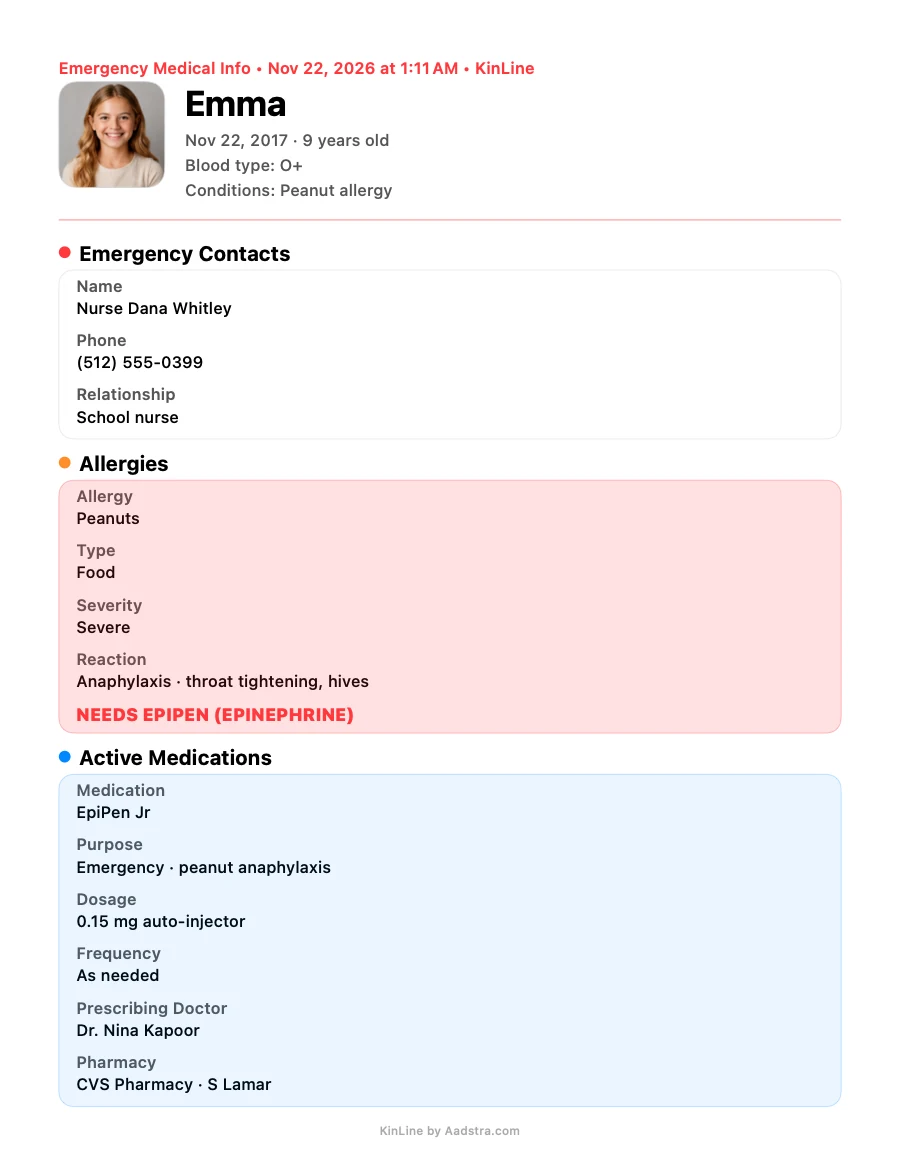
Before you head out, send the sitter one page for each child: allergies, medicines and who to call. It takes seconds, and it's always up to date.


Free to download · No account needed
Sound familiar?
The sitter is at the door and you're already late.
Tap PDF, pick Babysitter, and send it. Allergies, medicines and who to call, on one page.
Your daughter has a severe peanut allergy, and the sitter is new.
The page shows the allergy, how serious it is, and her EpiPen.
Grandma is watching the kids for the weekend.
Send her the same page for each child. She doesn't need the app.
The sitter isn't sure what a reaction looks like.
The page says it in your words, the way you wrote it in KinLine.
You'd rather not hand over your whole phone.
It's one page, made just for the sitter. Nothing else goes with it.
How it works
Open your child, tap Emergency Info, then PDF, and pick Babysitter. Send it by text, WhatsApp or email. The one-page PDF is on iPhone.
Rather have paper? Our free babysitter information sheet prints on one page.
Private by default.
Saved on your phone. No account, no password. We never get a copy of your records, so we can't see them.
How your privacy works, and how to check it yourselfMake the sitter page before Friday.
Free to download · No account needed